


NearStream VM20 4K AI Noise-Cancelling Streaming Webcam
The NearStream VM20 is a wired 4K streaming camera with 10x optical zoom and a built-in 8-mic AI noise-cancelling array. Plug it into a PC or Mac over USB-C for 4K30 with no drivers, or use its HDMI and Ethernet (RJ45) outputs at 1080p for multi-camera productions, switchers and network streaming.
Key features
- 4K at 30fps over USB-C; 1080p at 30fps over HDMI and RJ45
- 10x optical zoom (40x hybrid) with autofocus and an 80° field of view
- 1/2.8" 8MP Sony STARVIS sensor with HDR and 3D noise reduction
- 8 MEMS mics, 360° pickup up to about 5 m, AI noise suppression up to 18 dB
- 3.5mm and USB-C external microphone inputs
- Remote control with 3 presets, zoom, image modes, Auto Framing and privacy mode
- Powered by USB-C (5V/1A) or PoE; multi-camera and vertical shooting supported
- Works with Windows, macOS, Linux and ChromeOS; OBS, Streamlabs, Zoom, Teams and vMix (RTSP)
Please note: 4K is available over USB-C only. No power adapter, HDMI cable or network cable is included, and the VM20 has no battery or Wi-Fi.


A 4K streaming camera with real 10x optical zoom
The NearStream VM20 is a wired 4K streaming camera for streamers, podcasters, churches, teachers and businesses that have outgrown a normal webcam. It streams 4K at 30fps over USB-C, adds HDMI and Ethernet outputs for multi-camera setups, and pairs 10x optical zoom with an 8-mic AI noise-cancelling array.
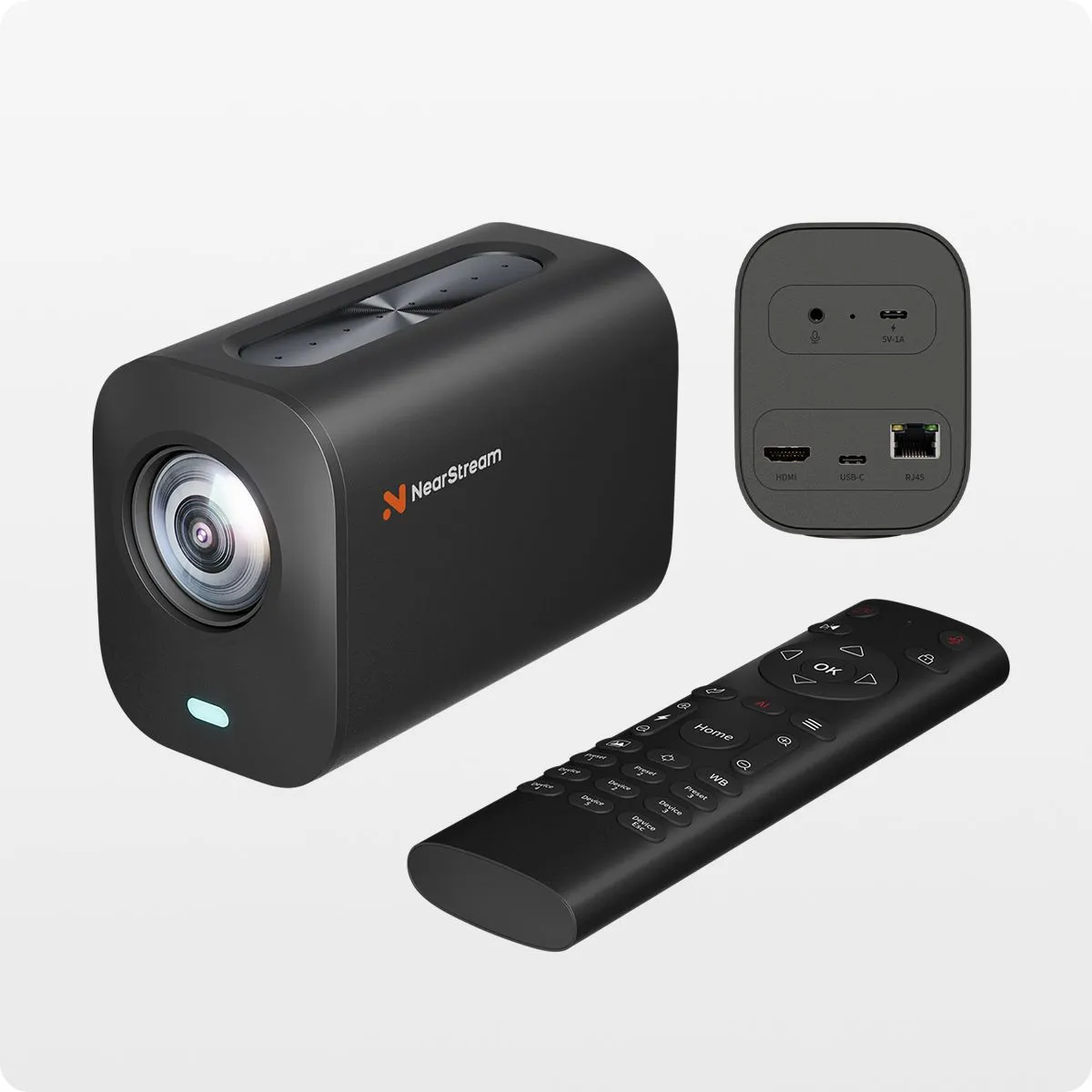
- 4K30over USB-C
- 10xoptical zoom (40x hybrid)
- 8MPSony STARVIS sensor
- 8 mics360° AI noise cancelling
- 3 outputsUSB-C, HDMI & RJ45
Get close without losing detail
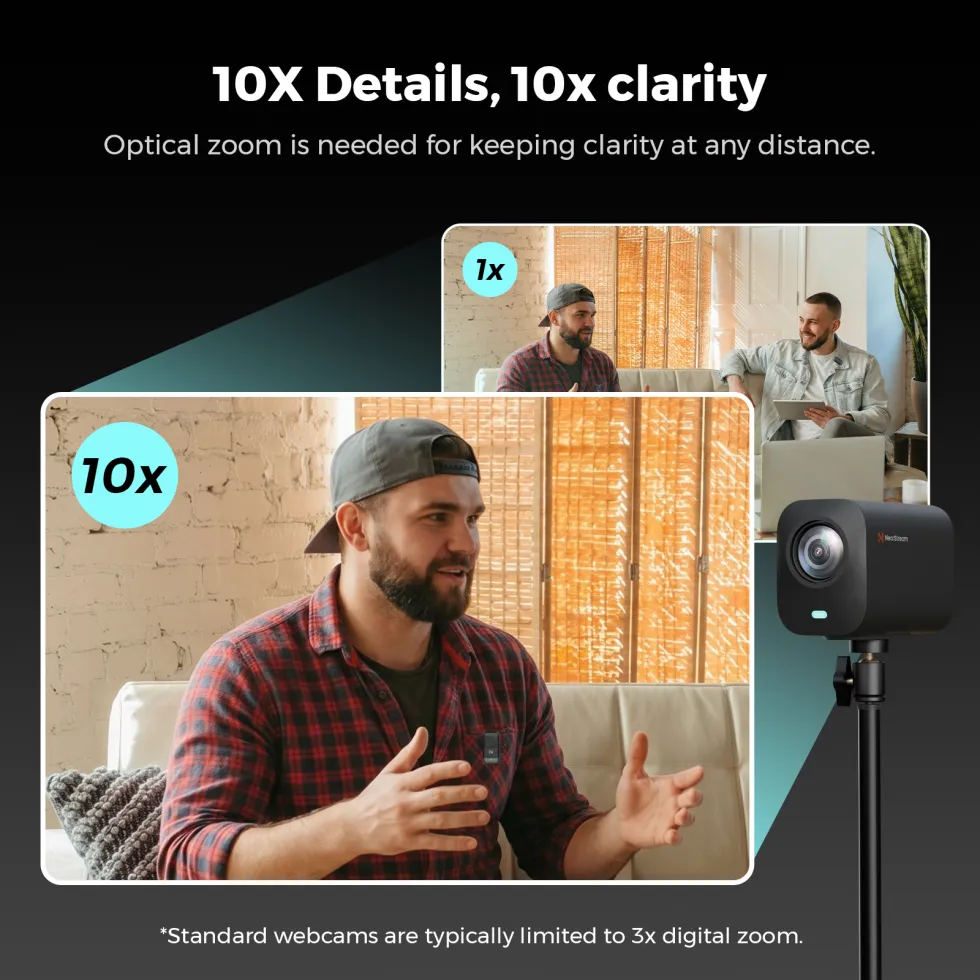
Most webcams crop the picture when you zoom, so it turns soft and blocky. The VM20 has a proper 10x optical zoom lens, with a further 4x digital on top, so close-ups of your face, your hands on an instrument or a product on the table stay sharp.
The 1/2.8" 8MP Sony STARVIS sensor handles dim rooms well, and HDR and 3D noise reduction keep the picture clean when the lighting isn’t perfect.
Three ways to connect
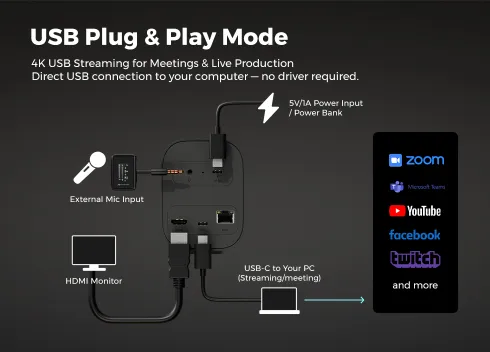
USB-C: 4K webcam
Plug into a Windows PC, Mac, Linux or ChromeOS computer and it works like any webcam, with no drivers. This is the only way to get 4K30, and it suits Zoom, Teams, OBS and Streamlabs.
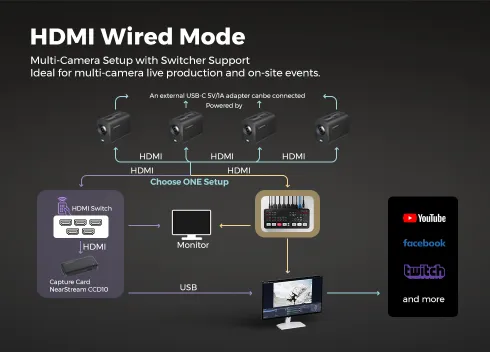
HDMI: multi-cam production
Send 1080p30 into a capture card, HDMI switcher or hardware video switcher. Ideal for church services, events and town-hall meetings with several cameras.
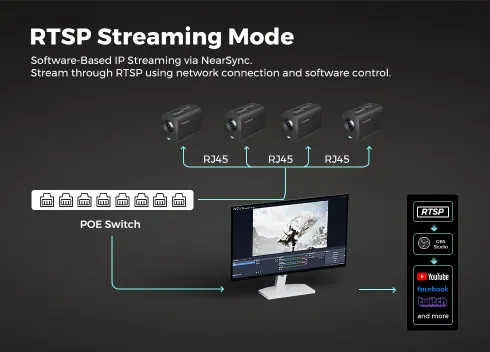
RJ45: network streaming
Connect to your network and pull a 1080p RTSP stream into OBS, Streamlabs or vMix, using the free NearSync app to get the stream address. A PoE switch can power the camera over the same cable.

Add angles as your show grows
Start with one VM20 and add more later. Switch between them in OBS on your PC, or run them through a hardware switcher for a desk-free production. Interviews, podcasts, sermons and live music all look more professional with a wide shot and a close-up to cut between.
The standard 1/4" thread on the base fits tripods, desk stands and wall mounts, and the camera can be set up for landscape, portrait or overhead shots.
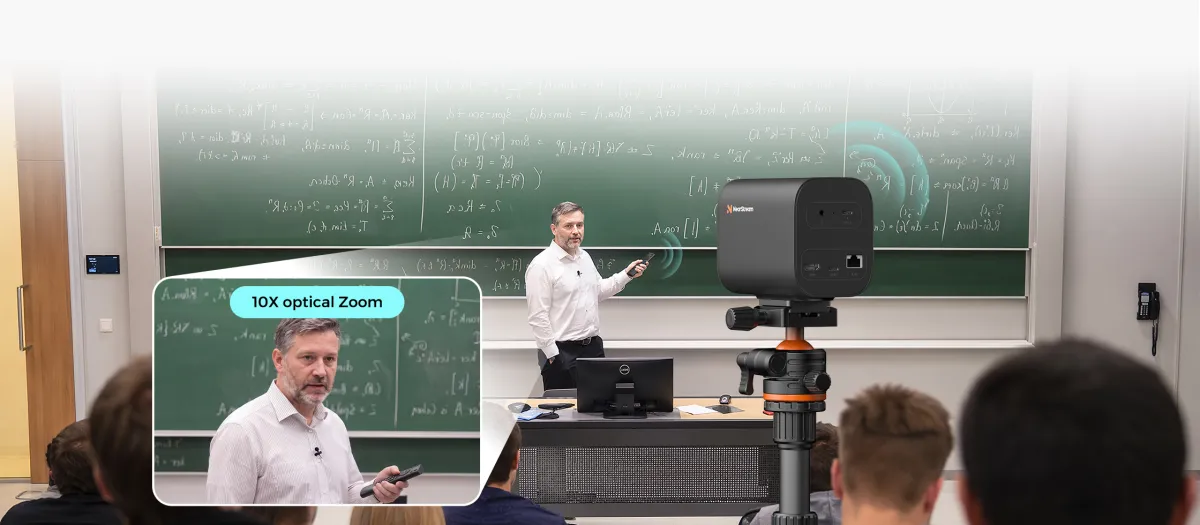
Reframe your shot without leaving your seat
The included RF remote zooms in and out, saves and recalls three preset positions, and switches between Standard, Portrait, Dress, Food, Texture and Outdoor image modes while you are live.
Auto Framing widens the shot to fit everyone at the table, and a privacy button cuts the video and mutes the mics instantly when you step away.
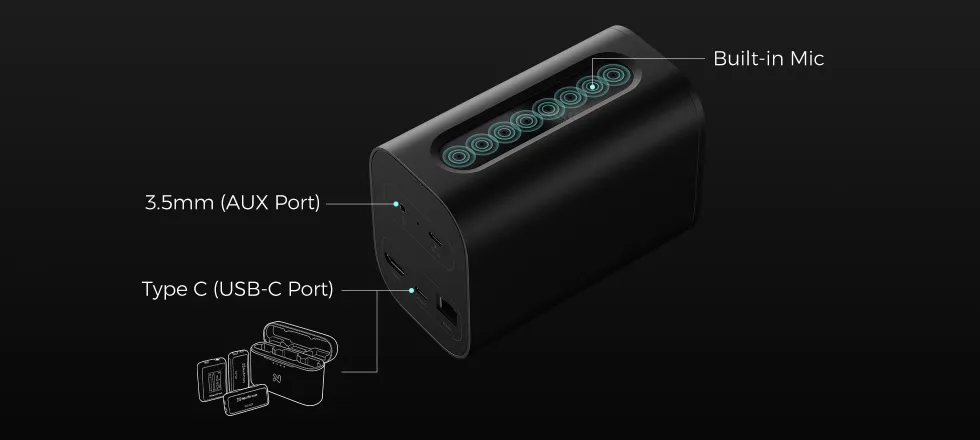
Eight mics with AI noise cancelling
Eight MEMS microphones pick up voices from all around the camera, up to about 5 m away. AI noise suppression cuts background noise by up to 18 dB, while beamforming and reverb suppression help in echoey rooms and boardrooms.
Already have a good mic? Plug it into the 3.5mm input or the USB-C port and the VM20 uses that instead.
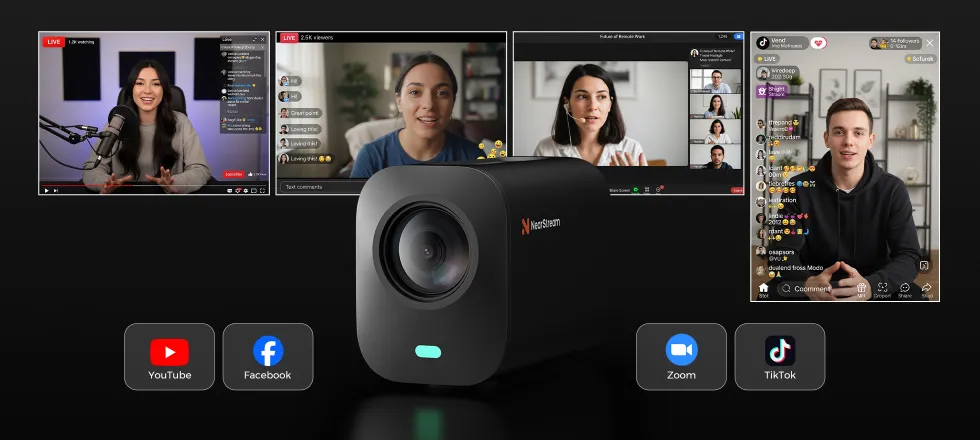
Stream to any platform, in any shape
Turn the VM20 to shoot vertical video for TikTok and Reels, or keep it horizontal for YouTube, Twitch, Facebook and X. Stream through OBS or Streamlabs, or use it as your camera in Zoom, Teams and Google Meet.
Status lights show what the camera is doing at a glance: white for power, blue for USB, green for RTSP, magenta for HDMI and red when the mics are muted.
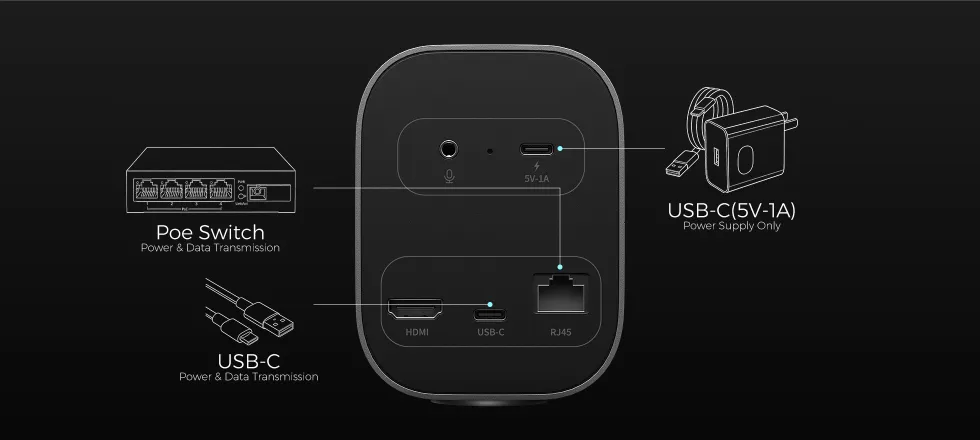
Powered by USB-C or PoE
The VM20 draws just 5V/1A, so a single USB-C cable from your computer carries both power and video. In an HDMI setup, power it from a USB-C charger, or run one network cable from a PoE switch for both power and a network connection.
Frequently asked questions
Does the NearStream VM20 output 4K over HDMI?
No. 4K at 30fps is only available over USB-C to a computer. The HDMI and RJ45 (Ethernet) outputs run at 1080p at 30fps, which suits capture cards, video switchers and network streaming.
Is a power adapter included with the VM20?
No. The VM20 runs on 5V/1A over USB-C, so it is normally powered by the computer it is plugged into. For HDMI-only setups, use a USB-C charger (not included) or power it over Ethernet from a PoE switch.
Will the VM20 work with my Mac, OBS, Zoom or Teams?
Yes. It is a standard UVC webcam over USB-C, so no drivers are needed on Windows, macOS, Linux or ChromeOS. It works with OBS, Streamlabs, Zoom and Microsoft Teams, and with vMix via RTSP over Ethernet.
Does the VM20 have a battery or Wi-Fi?
No. The VM20 is a wired camera with no built-in battery and no Wi-Fi. If you need a wireless streaming camera, look at the NearStream VM33 or VM46.
Can I use more than one VM20 at the same time?
Yes. Connect several VM20s to a PC over USB and switch between them in OBS, run them over HDMI into a capture card or hardware video switcher, or connect them over your network with RJ45.
Can I connect an external microphone?
Yes. Plug a microphone into the 3.5mm audio input or the USB-C port. Otherwise the built-in 8-mic 360° array with AI noise suppression picks up voices within about 5 m.
Does the VM20 have autofocus?
Yes. It focuses automatically, down to 0.3 m at 1x zoom, and has an 80° field of view. You can switch to manual focus with the remote if auto-zoom or focus hunting gets in the way.
Specifications
| Model | NearStream VM20 (AW-VM20) |
|---|---|
| Image sensor | 1/2.8" 8MP Sony STARVIS CMOS |
| Zoom | 10x optical, 4x digital (40x hybrid) |
| Aperture / focal length | F1.85 - 2.63 / 4.34 - 35.17 mm |
| Field of view | 80° (distortion-free lens) |
| Focus | Autofocus, closest 0.3 m at 1x zoom |
| Max resolution | USB-C: 4K @ 30fps · HDMI and RJ45: 1080p @ 30fps |
| Video encoding | MJPEG up to 4K30, YUV up to 480p30 |
| Image processing | HDR, 3D noise reduction, anti-flicker, auto exposure and white balance, 6 image modes |
| Microphones | 8 x MEMS, 360° omnidirectional array, about 5 m pickup |
| Audio processing | AI noise suppression (up to 18 dB), reverb suppression, beamforming, auto gain |
| Ports | 1 x USB-C (USB 2.0), 1 x HDMI 2.0 out, 1 x RJ45 with PoE, 3.5mm mic in |
| Protocols | UVC (USB), RTSP (Ethernet, via NearSync) |
| Remote control | RF 433 MHz remote, included |
| Operating systems | Windows, macOS, Linux, ChromeOS |
| Power | 5V 1A via USB-C, or PoE |
| Battery / Wi-Fi | No / No |
| Mounting | 1/4" thread on base |
| Dimensions | 136 x 72 x 98 mm |
| Weight | 550 g |
What’s in the box
- NearStream VM20 camera
- Remote control
- USB 2.0 Type-C data cable (with USB-A adapter)
- User manual
- Quick start guide
- Warranty card
Specifications from NearStream and subject to change without notice. Images are for illustration. Box contents may vary by region.


 Powered By


